
Draw it in your own words.
Tell the assistant what you want: room sizes, a covered porch, where the panels go. Shape the drawing together, and edit any wall, dimension, or note by hand.
+ FREE DESIGN SOFTWARE FOR DIY BUILDERS
You’re ready to build the home, the workshop, the solar system. AI CAD PRO helps you turn that idea into clear plans and get through the paperwork, without figuring it all out alone.
FREE TO USE / WINDOWS / RUNS ON YOUR CHATGPT SUBSCRIPTION

WHY I’M BUILDING THIS
I started building AI CAD PRO after watching capable DIY builders get stuck before they ever broke ground. Not on the building. On the drawings, the paperwork, and figuring out what the local permitting office actually needs.
People who can frame a wall or wire a solar array shouldn’t be stopped by a plan package. So AI CAD PRO puts editable CAD drawings and an AI assistant in one place, to help you turn an idea into clear plans and work through the revisions that follow.
You’re willing to build it yourself. You shouldn’t have to figure it all out alone.
Marco Williams Creator of AI CAD PRO
HOW IT WORKS
Editable drawings and an AI assistant in one workspace, so the plan in your head can become a plan on paper.
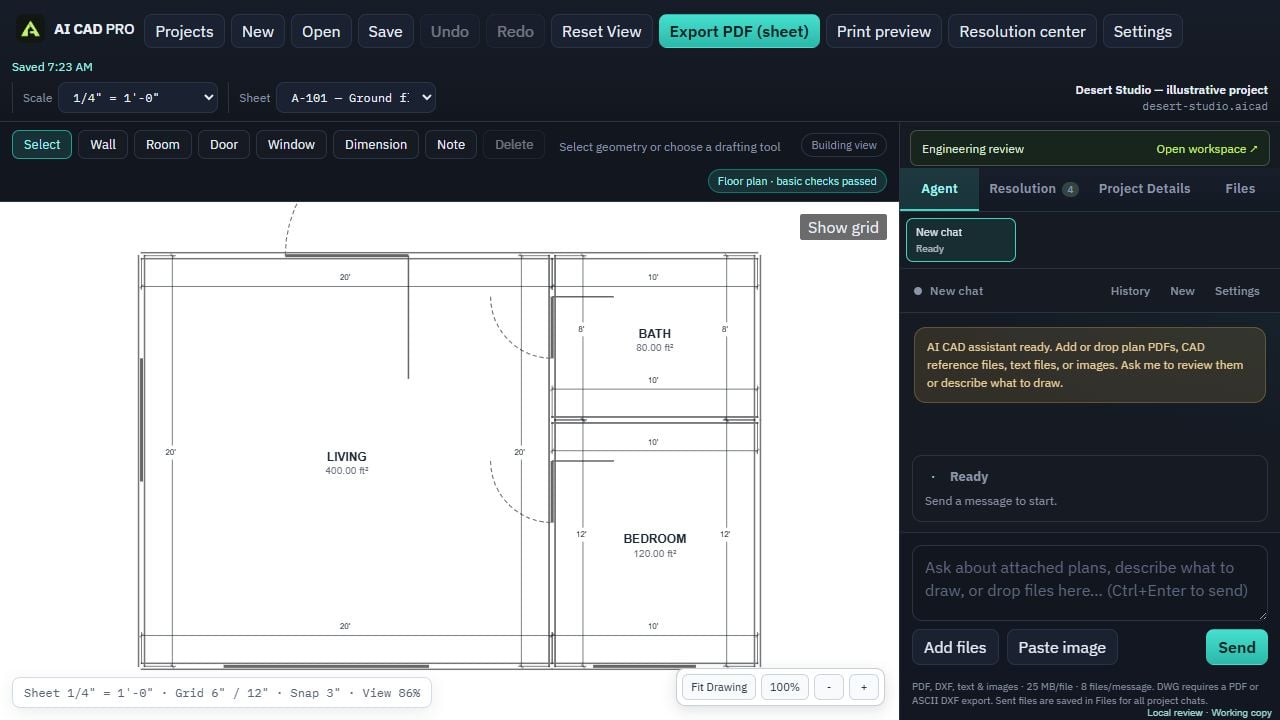
Tell the assistant what you want: room sizes, a covered porch, where the panels go. Shape the drawing together, and edit any wall, dimension, or note by hand.
Bring in what you already have, like survey PDFs, old plans, or equipment spec sheets. AI CAD PRO points out missing information and where you can find it.
Work through changes and review comments one at a time. Preview every sheet exactly as it will print, then export a coordinated PDF set.
FREE TO USE
There’s nothing to buy from us. The AI assistant runs on your own ChatGPT subscription.
Install AI CAD PRO on your PC. Your projects are saved on your own computer.
Open Settings and connect your ChatGPT account. Requests count toward your plan’s usage.
Add the address and what you want to build, then start drawing with the assistant.
COMING LATER IN DEVELOPMENT
Some projects need an engineer’s review before they can be permitted. We’re building an optional program that connects you with licensed engineers who can review your plans, send specific comments you can work through in the app, and seal the final set when they approve it.
It isn’t open yet, and the free software doesn’t depend on it.
HELP BUILD IT
The biggest cost behind AI CAD PRO is expert input: working with engineers to check the drawings, strengthen the design guidance, and make sure plans give reviewers what they need. Collaborating with a single engineer can cost up to $5,000.
If you believe more people should be able to plan what they build, you can help by donating, or by sharing the campaign with a builder, a homesteading group, or an engineer who gets it.
Support on GoFundMeAI CAD PRO stays free whether or not you donate.
GOOD QUESTIONS
Yes. AI CAD PRO is free to download and free to use. The AI assistant runs on your own ChatGPT subscription. Donating to the campaign is optional and doesn’t unlock anything extra.
The assistant uses OpenAI’s models to draw, research, and revise with you. Instead of charging you for that, AI CAD PRO connects to your own ChatGPT account, and requests count toward your plan’s usage limits. If you’d rather pay per use, you can connect an OpenAI API key instead; those requests are billed by OpenAI.
No. You can start by describing what you want in plain words, and the drawing tools are there when you want to make direct edits. You’ll still want to review the plans and give accurate information about your site and project.
No software can promise that. AI CAD PRO helps you prepare clear, organized plans and work through review comments. Your local permitting office decides what it needs and whether to approve, and some projects require an engineer’s stamp.
On your computer. Projects and reference files are saved locally. When you ask the assistant something, the relevant content is sent through your ChatGPT account to answer it.
Only anonymous statistics. The app reports its version, your Windows version, and counts of the features used, and this website counts visits and clicks without cookies. Neither ever sends your drawings, files, prompts, name, or email.
A 64-bit Windows PC, an internet connection for the AI assistant, and a ChatGPT subscription. AI CAD PRO is Windows-only for now.
This first release isn’t code-signed yet, so Microsoft SmartScreen may show “Windows protected your PC.” Choose More info, then Run anyway. If you want to check the file, compare it with the SHA-256 shown in the download window.
2D plans: floor plans, electrical, solar, site plans, elevations, sections, and one-line diagrams, with notes, dimensions, and PDF sheet sets. It isn’t a 3D modeling tool, and it can’t open DWG files. Export a PDF or ASCII DXF from your other CAD software and attach that instead.
YOUR PROJECT STARTS WITH A PLAN
For Windows · Works with your ChatGPT subscription